Herinneringen en slimme herinneringen instellen
Stel herinneringen in voor elke activiteit, zoals voeren, wandelingen of medicatie. Een slimme herinnering gaat een stap verder: die begint met aftellen telkens wanneer je een activiteit registreert.
Een herinnering toevoegen
- Tik op je huisdier op het hoofdscherm.
- Open het tabblad Herinneringen.
- Tik op de activiteit waarvoor je een herinnering wilt.
- Tik op de knop Herinnering met het plusteken.
- Kies hoe vaak: Eenmalig, Slim, Dagelijks, Wekelijks of Maandelijks.
- Stel de datum, tijd of dag in.
- Voeg desgewenst een Notitie toe.
- Tik op Opslaan.
Andere soorten herinneringen
- Eenmalig herinnert je op één datum en tijdstip.
- Dagelijks herinnert je elke dag op hetzelfde tijdstip, of om de paar dagen (tot 30).
- Wekelijks herinnert je op één dag van de week, elke week of om de paar weken (tot 5).
- Maandelijks herinnert je elke maand op dezelfde datum, vanaf de Startdatum.
Een slimme herinnering instellen
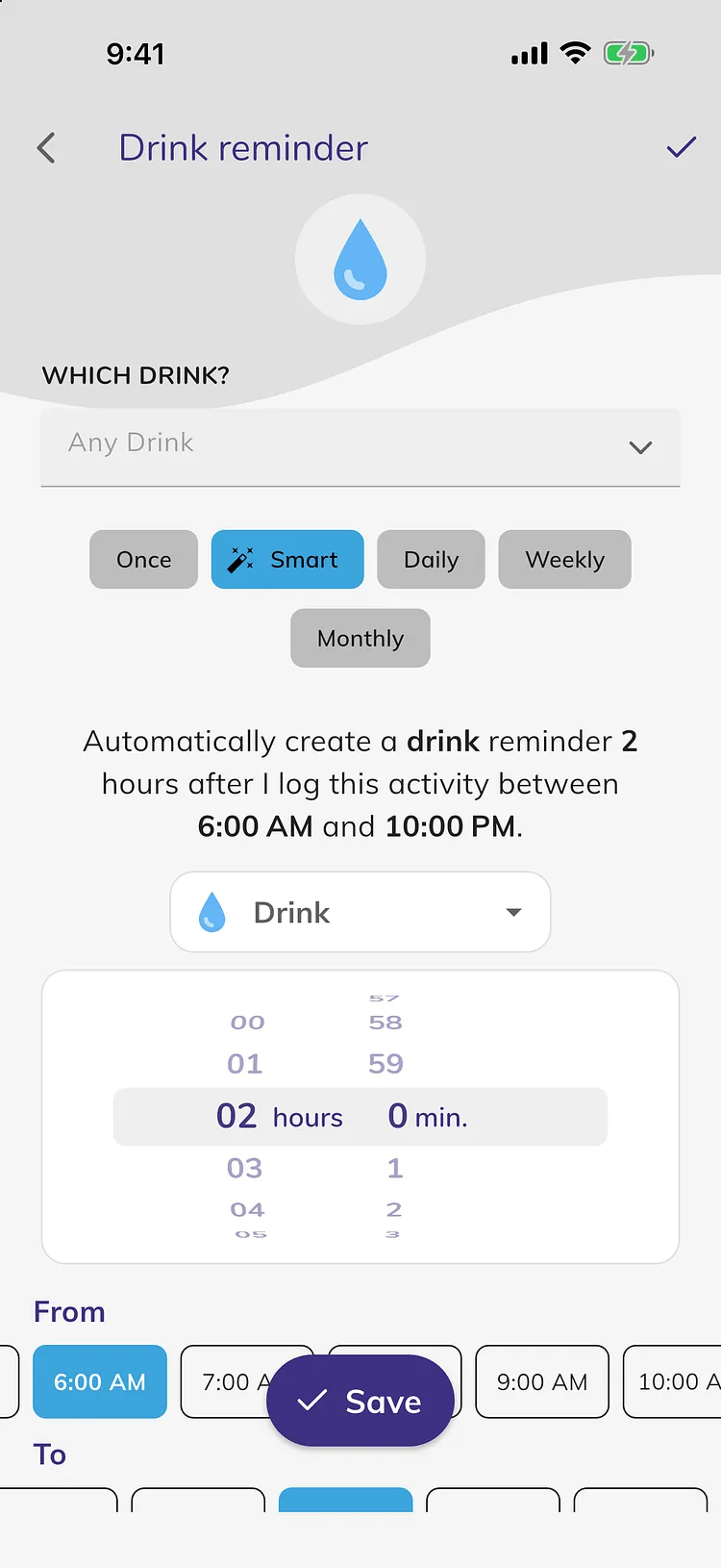
Bijvoorbeeld: 2 uur nadat je Drinken registreert, herinner je eraan om je huisdier uit te laten voor Plassen.
- Tik op het tabblad Herinneringen op de activiteit die de aftelling start, bijvoorbeeld Drinken.
- Tik op de knop Herinnering.
- Tik op Slim.
- Kies in de activiteitenlijst waarvoor je herinnerd wilt worden, bijvoorbeeld Plassen. Die begint als dezelfde activiteit, zodat je ook kunt worden herinnerd om deze te herhalen, zoals Eten 4 uur na de laatste maaltijd.
- Draai aan het wiel om in uren en minuten in te stellen hoe lang daarna.
- Kies onder Van en Tot de uren waarin de herinnering actief moet zijn.
- Controleer de zin bovenaan, bijvoorbeeld "Automatisch een herinnering voor plassen aanmaken 2 uur nadat ik deze activiteit registreer tussen 6:00 AM en 10:00 PM."
- Tik op Opslaan.
Hoe slimme herinneringen werken
- Alleen je laatste registratie telt. Registreer de activiteit opnieuw en de aftelling begint opnieuw.
- Het tijdstip van de registratie moet tussen Van en Tot liggen. Een registratie buiten die uren maakt geen herinnering aan.
- Om de hele dag te dekken, kies je 12:00 AM voor zowel Van als Tot. De uren mogen ook na middernacht doorlopen, bijvoorbeeld van 8:00 PM tot 6:00 AM.
- Als je een registratie maakt voor een eerder tijdstip en het herinneringstijdstip is al voorbij, wordt er geen herinnering verstuurd.
Een herinnering wijzigen, kopiëren of uitzetten
- Open de activiteit op het tabblad Herinneringen.
- Gebruik de schakelaar naast een herinnering om deze uit of aan te zetten.
- Tik op een herinnering om meer opties te zien.
- Tik op het potloodpictogram om deze te wijzigen, op Kopiëren om er een nieuwe van te maken, of op het prullenbakpictogram om deze te verwijderen.
Je kunt alleen herinneringen uitzetten of verwijderen die je zelf hebt aangemaakt.
Iemand anders herinneren
Je kunt ook een herinnering sturen naar andere personen in je account. Zie Hoe andere gebruikers herinneren.
Voor medicijnen en supplementen stel je de herinneringstijden in via de kaart Medicijnen & Supplementen. Zie Hoe medicijnen en supplementen bijhouden.
Je kunt ook de Assistent vragen, bijvoorbeeld "Herinner me eraan Max uit te laten 2 uur nadat hij heeft gedronken". Zie Hoe de Assistent gebruiken.
Premium
Herinneringen maken deel uit van Premium. Zonder Premium toont het tikken op de knop Herinnering hoe je kunt upgraden. Zie Wat is gratis en wat zit in Premium.
Probleemoplossing
- Tikken op Opslaan opent het inlogscherm. Slimme herinneringen vereisen dat je bent ingelogd.
- De knop Herinnering ontbreekt. Je kunt maximaal 30 herinneringen per activiteit hebben. Verwijder een herinnering die je niet meer nodig hebt.
- Een slimme herinnering is niet afgegaan. Controleer of de herinnering aan staat en of het tijdstip van de registratie tussen Van en Tot lag.
- Ik krijg geen herinneringen. Controleer of meldingen voor Doggy Time zijn toegestaan in de instellingen van je telefoon. Op Android, zie Hoe late herinneringen of registraties die niet synchroniseren oplossen.